
January 2026 Proton Playbook
Welcome to the first Proton Playbook of 2026.
New year, fresh start — and we're kicking things off with updates designed to give your team more visibility, more control, and a first look at something we've been building behind the scenes.
Here's what's new.
🏆 This month’s MVP
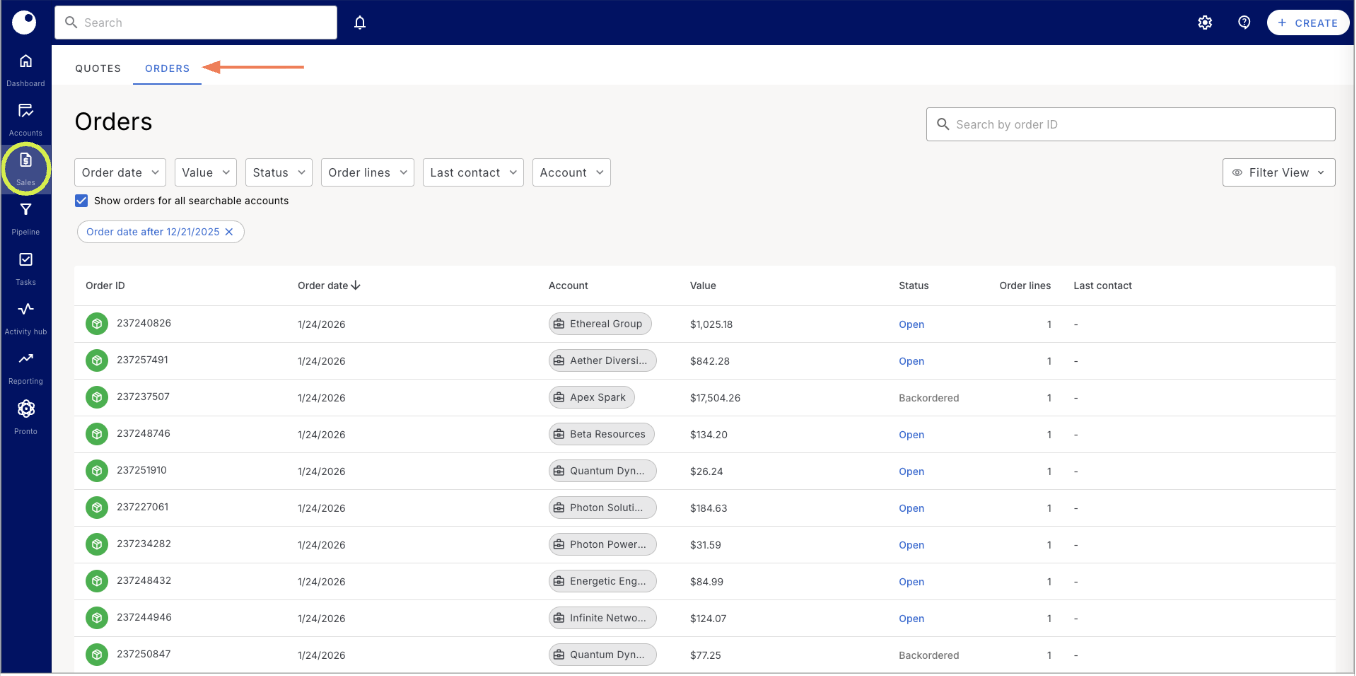
See every order in one place
Introducing the Orders page
The Orders Table gives your team a dedicated view for managing and tracking orders — similar to the global views you already know and love for accounts, activities, and quotes.
With the new Orders page, teams can:
-
See all orders in one place with a clean, sortable view
-
Use the "view as" functionality so managers can see orders as any rep on their team
-
Quickly filter and find orders that need attention – like identifying backorders early and recommending substitutes before customers ask
See all orders in one place with a clean, sortable view
Use the "view as" functionality so managers can see orders as any rep on their team
Quickly filter and find orders that need attention – like identifying backorders early and recommending substitutes before customers ask
Good to know: The ability to filter Orders by custom fields (similar to the Quotes table) is coming soon and already on the roadmap.
This feature is about giving teams a stronger foundation for order visibility first, then layering in more power from there.
🏈 Extra yard gains
Refreshed Navigation
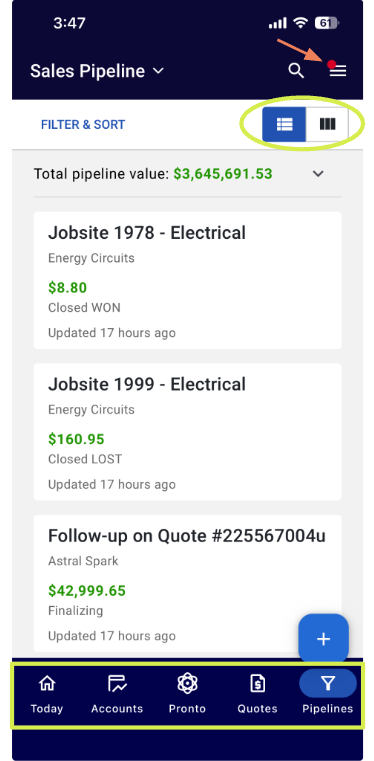
We've given the mobile navigation a refresh to make it easier to get where you need to go.
What's changed:
-
Tasks and Activity now live in the menu on the upper right corner (the ☰ icon on the image)
-
Pronto and Quotes are now front and center on the main navigation
-
Everything you're used to is still there — just reorganized for faster access
Tasks and Activity now live in the menu on the upper right corner (the ☰ icon on the image)
Pronto and Quotes are now front and center on the main navigation
Everything you're used to is still there — just reorganized for faster access
This is the first step toward a broader navigation overhaul that's also coming to desktop soon. The goal is the same across both: less digging, more doing.
Pipeline View Toggle
Within mobile, users can now toggle between different list views (circled on the image) on the “Pipeline” tab to quickly find relevant opportunities. Whether you prefer seeing deals as cards or rows, you can switch views based on how you sell — and use the pipeline dropdown in the header to jump between different pipelines on the fly.
🤖 AI, Captain!
Create Campaigns with Pronto
Managers and admins can now ask Pronto to create campaigns. Upload a list of product IDs, tell Pronto what you're trying to accomplish, and let it handle the rest. No manual setup required.
Similar to how Pronto creates tasks and call notes, this is a create-only feature for now — you won't be able to edit campaigns through Pronto yet. But it's a fast way to spin up a new product push without leaving your conversation.
Smarter Pronto Chat Thread Management
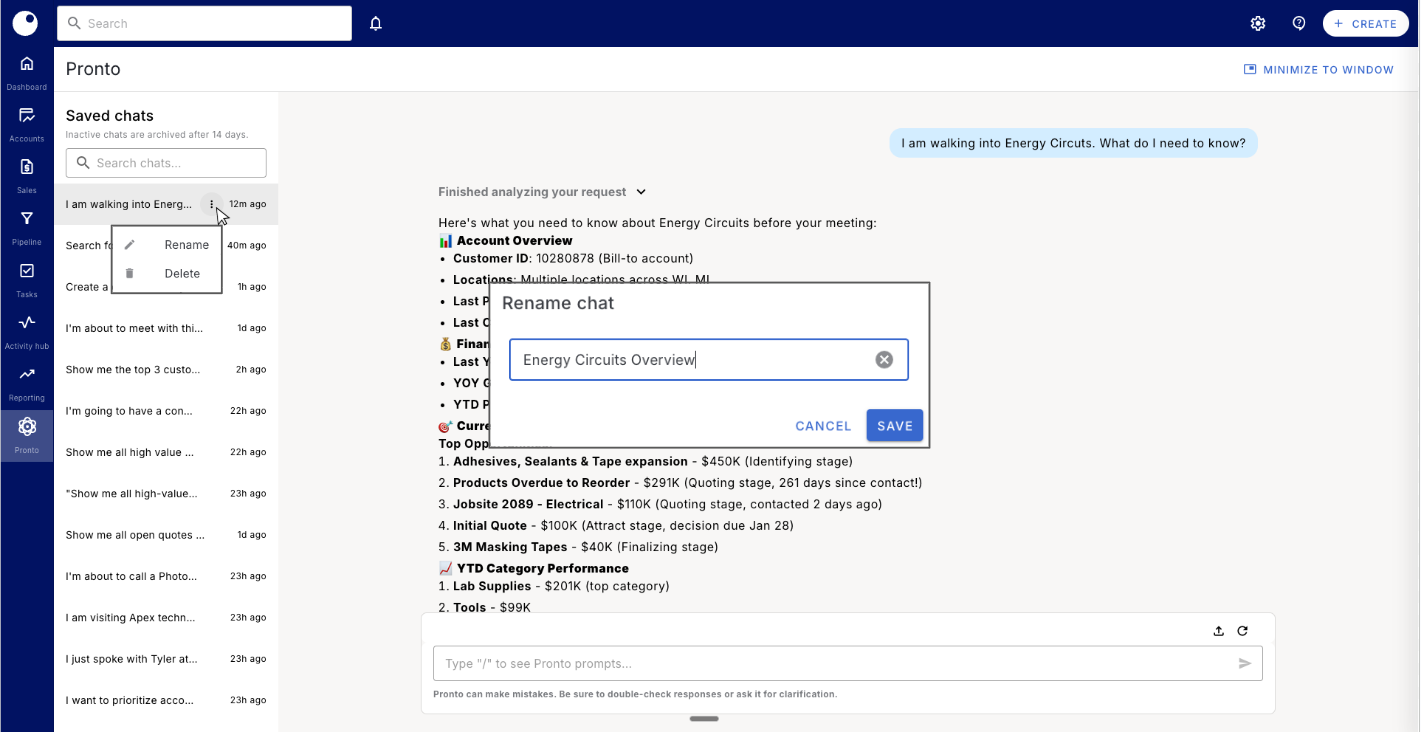
Chats in Pronto just got a lot easier to navigate.
Here's what's new:
-
Rename chats: Want a specific name so you can find it later? You can now rename it.
-
Delete chats: Clear out old conversations that are just taking up space.
-
Search chats: Find past conversations by name so you can pick up where you left off or pull information you need.
Rename chats: Want a specific name so you can find it later? You can now rename it.
Delete chats: Clear out old conversations that are just taking up space.
Search chats: Find past conversations by name so you can pick up where you left off or pull information you need.
If you've been using Pronto for call planning or account prep, this makes it much easier to go back and reference what you discussed — or continue the conversation without starting over.
👟 In warmups
Cross Reference (coming soon)
We’re getting close to rolling out Cross Reference, and we wanted to give you an early look at what’s coming.
It's designed to solve one of the most tedious parts of quoting: matching competitor or customer part numbers to your catalog.
Cross Reference is a matching engine designed to solve one of the most time-consuming parts of quoting and order entry: accurately mapping competitor or customer part numbers to your catalog.
Here's the problem it solves: A customer sends over a list of part numbers or vague product names from another supplier. Today, your team has to manually look up each one, find the equivalent in your catalog, and build the quote line by line. It's slow, error-prone, and eats into time that could be spent selling.
How Cross Reference will work:
-
Upload a customer’s product list – no matter how messy, vague, or incomplete
-
Proton searches your catalog and finds matches automatically using AI
-
Review the results, make adjustments if needed, and move forward with your quote
Upload a customer’s product list – no matter how messy, vague, or incomplete
Proton searches your catalog and finds matches automatically using AI
Review the results, make adjustments if needed, and move forward with your quote
The result: cleaner quote and order workflows, faster turnaround times, and more confidence that you’re matching the right products — not just the closest guess.
We’re wrapping up the final pieces now, but this will also serve as the foundation for future workflows — from quote and order entry automation to catalog alignment across systems.
More to share soon! If faster, more accurate product matching is on your roadmap, this is one to watch.
📣 After the game stats
Clearer self-serve lead uploads
We’ve updated the self-serve bulk lead upload experience with clearer, more guided instructions.
When uploading leads, Proton now:
-
Pre-populates example rows with your data to show examples of correct formatting
-
Improved helper text below the drag and drop to make required fields and expectations easier to follow
Pre-populates example rows with your data to show examples of correct formatting
Improved helper text below the drag and drop to make required fields and expectations easier to follow
The goal: fewer failed uploads, less guesswork, and faster time to value for admins and ops teams.
✉️ Stay in touch
Many updates in these Playbooks started as customer feedback.
If there’s a workflow you want faster, a feature you want expanded, or something you wish worked differently, reply to this email or reach out to your CSM. Your input directly shapes what we build next.
That’s it for January. More coming soon — and we’re excited for what this year has in store.